Managed WordPress web host WP Engine announced that they are acquiring NitroPack, a leading SaaS website performance optimization solution. The acquisition of of NitroPack by WP Engine demonstrates their continued focus on improving site performance for clients.
NitroPack
NitroPack is a relatively pricey but well regarded site performance solution that has for years been known as a leader. WP Engine and NitroPack formed a partnership in 2023 that would power WP Engine’s PageSpeed Boost product that is offered internally to customers. The NitroPack team will now become integrated within WP Engine this month, July.
There are no immediate plans to change the pricing options for NitroPack so it’s safe to say that it will continue to be a standalone product. WP Engine commented to Search Engine Journal that there will be no immediate changes in services pricing or billing for current NitroPack customers.
“We have no immediate plans to change the pricing options for NitroPack products.
Today NitroPack works with page builders and other hosting providers and that will continue to be available. In the coming months, we will continue to leverage NitroPack to enhance additional functionality to Page Speed Boost for WP Engine’s customers.”
What the acquisition means for WP Engine customers is that WP Engine will continue to leverage NitroPack’s technology to add even more functionalities to their PageSpeed Boost product.
The WP Engine spokesperson said that these new integrations will be coming to WP Engine PageSpeed Boost in a matter of months.
They shared:
“In the coming months, we will continue to leverage NitroPack’s strength to enhance additional functionality to Page Speed Boost.”
Read the official announcement:
WP Engine Acquires NitroPack, Extending Leadership in Managed WordPress Site Performance
Featured Image by Shutterstock/Asier Romero
Instead of counting the number of clicks or views a video gets, YouTube’s algorithms focus on ensuring viewers are happy with what they watch.
This article examines how YouTube’s algorithms work to help users find videos they like and keep them watching for longer.
We’ll explain how YouTube selects videos for different parts of its site, such as the home page and the “up next” suggestions.
We’ll also discuss what makes some videos appear more than others and how YouTube matches videos to each person’s interests.
By breaking this down, we hope to help marketers and YouTubers understand how to work better with YouTube’s system.
A summary of all facts is listed at the end.
Prioritizing Viewer Satisfaction
Early on, YouTube ranked videos based on watch time data, assuming longer view durations correlated with audience satisfaction.
However, they realized that total watch time alone was an incomplete measure, as viewers could still be left unsatisfied.
So, beginning in the early 2010s, YouTube prioritized viewer satisfaction metrics for ranking content across the site.
The algorithms consider signals like:
- Survey responses directly asking viewers about their satisfaction with recommended videos.
- Clicks on the “like,” “dislike,” or “not interested” buttons which indicate satisfaction.
- Overall audience retention metrics like the percentage of videos viewed.
- User behavior metrics, including what users have watched before (watch history) and what they watch after a video (watch next).
The recommendation algorithms continuously learn from user behavior patterns and explicit satisfaction inputs to identify the best videos to recommend.
How Videos Rank On The Homepage
The YouTube homepage curates and ranks a selection of videos a viewer will most likely watch.
The ranking factors include:
Performance Data
This covers metrics like click-through rates from impressions and average view duration. When shown on its homepages, YouTube uses these traditional viewer behavioral signals to gauge how compelling a video is for other viewers.
Personalized Relevance
Besides performance data, YouTube relies heavily on personalized relevance to customize the homepage feed for each viewer’s unique interests. This personalization is based on insights from their viewing history, subscriptions, and engagement patterns with specific topics or creators.
How YouTube Ranks Suggested Video Recommendations
The suggested videos column is designed to keep viewers engaged by identifying other videos relevant to what they’re currently watching and aligned with their interests.
The ranking factors include:
Video Co-Viewing
YouTube analyzes viewing patterns to understand which videos are frequently watched together or sequentially by the same audience segments. This allows them to recommend related content the viewer will likely watch next.
Topic/Category Matching
The algorithm looks for videos covering topics or categories similar to the video being watched currently to provide tightly relevant suggestions.
Personal Watch History
A viewer’s viewing patterns and history are a strong signal for suggesting videos they’ll likely want to watch again.
Channel Subscriptions
Videos from channels that viewers frequently watch and engage with are prioritized as suggestions to keep them connected to favored creators.
External Ranking Variables
YouTube has acknowledged the following external variables can impact video performance:
- The overall popularity and competition level for different topics and content categories.
- Shifting viewer behavior patterns and interest trends in what content they consume.
- Seasonal effects can influence what types of videos people watch during different times of the year.
Being a small or emerging creator can also be a positive factor, as YouTube tries to get them discovered through recommendations.
The company says it closely monitors success rates for new creators and is working on further advancements like:
- Leveraging advanced AI language models to better understand content topics and viewer interests.
- Optimizing the discovery experience with improved layouts and content pathways to reduce “choice paralysis.”
Strategies For Creators
With viewer satisfaction as the overarching goal, this is how creators can maximize the potential of having their videos recommended:
- Focus on creating content that drives high viewer satisfaction through strong audience retention, positive survey responses, likes/engagement, and low abandon rates.
- Develop consistent series or sequel videos to increase chances of being suggested for related/sequence views.
- Utilize playlists, end screens, and linked video prompts to connect your content for extended viewing sessions.
- Explore creating content in newer formats, such as Shorts, live streams, or podcasts, that may align with changing viewer interests.
- Monitor performance overall, specifically from your existing subscriber base as a baseline.
- Don’t get discouraged by initial metrics. YouTube allows videos to continuously find relevant audience segments over time.
- Pay attention to seasonality trends, competition, and evolving viewer interests, which can all impact recommendations.
In Summary – 20 Key Facts About YouTube’s Algorithm
- YouTube has multiple algorithms for different sections (homepage, suggested videos, search, etc.).
- The recommendation system powers the homepage and suggested video sections.
- The system pulls in videos that are relevant for each viewer.
- Maximizing viewer satisfaction is the top priority for rankings.
- YouTube uses survey responses, likes, dislikes, and “not interested” clicks to measure satisfaction.
- High audience retention percentages signal positive satisfaction.
- Homepage rankings combine performance data and personalized relevance.
- Performance is based on click-through rates and average view duration.
- Personalized relevance factors include watch history, interests, and subscriptions.
- Suggested videos prioritize content that is co-viewed by the same audiences.
- Videos from subscribed channels are prioritized for suggestions.
- Consistent series and sequential videos increase suggestions for related viewing.
- Playlists, end screens, and linked videos can extend viewing sessions.
- Creating engaging, satisfying content is the core strategy for recommendations.
- External factors like competition, trends, and seasonality impact recommendations.
- YouTube aims to help new/smaller creators get discovered through recommendations.
- AI language models are improving content understanding and personalization.
- YouTube optimizes the discovery experience to reduce “choice paralysis.”
- Videos can find audiences over time, even if initial metrics are discouraging.
- The algorithm focuses on delivering long-term, satisfying experiences for viewer retention.
Insight From Industry Experts
While putting together this article, I reached out to industry experts to ask about their take on YouTube’s algorithms and what’s currently working for them.
Greg Jarboe, the president and co-founder of SEO-PR and author of YouTube and Video Marketing, says:
“The goals of YouTube’s search and discovery system are twofold: to help viewers find the videos they want to watch, and to maximize long-term viewer engagement and satisfaction. So, to optimize your videos for discovery, you should write optimized titles, tags, and descriptions. This has been true since July 2011, when the YouTube Creator Playbook became available to the public for the first time.
However, YouTube changed its algorithm in October 2012 – replacing ‘view count’ with ‘watch time.’ That’s why you need to go beyond optimizing your video’s metadata. You also need to keep viewers watching with a variety of techniques. For starters, you need to create a compelling opening to your videos and then use effective editing techniques to maintain and build interest through the video.
There are other ranking factors, of course, but these are the two most important ones. I’ve used these video SEO best practices to help the Travel Magazine channel increase from just 1,510 to 8.7 million views. And these video SEO techniques help the SonoSite channel grow from 99,529 views to 22.7 million views.
The biggest recent trend is the advent of YouTube Shorts, which is discoverable on the YouTube homepage (in the new Shorts shelf), as well as across other parts of the app. For more details, read “Can YouTube Shorts Be Monetized? Spoiler Alert: Some Already Are!“
Brie E. Anderson, an SEO and digital marketing consultant, says:
“In my experience, there are a few things that are really critical when it comes to optimizing for YouTube, most of which won’t be much of a surprise. The first is obviously the keyword you choose to target. It’s really hard to beat out really large and high authority channels, much like it is on Google. That being said, using tools like TubeBuddy can help you get a sense of the keywords you can compete for.
Another big thing is focusing on the SERP for YouTube Search. Your thumbnail has to be attention-grabbing – this is honestly what we test the most and one of the most impactful tests we run. More times than not, you’re looking at a large face, and max four words. But the amount of contrast happening in the thumbnail and how well it explains the topic of the video is the main concern.
Also, adding the ‘chapters’ timestamps can be really helpful. YouTube actually shows these in the SERP, as mentioned in this article.
Lastly, providing your own .srt file with captions can really help YouTube understand what your video is about.
Aside from actual on-video optimizations, I usually encourage people to write blog posts and embed their videos or, at the very least, link to them. This just helps with indexing and building some authority. It also increases the chance that the video will help YOUR SITE rank (as opposed to YouTube).”
Sources: YouTube’s Creator Insider Channel (1, 2, 3, 4, 5, 6), How YouTube Works
More resources:
- YouTube Unveils New Content And Ad Offerings At Brandcast
- The 30 Most-Subscribed YouTube Individuals (Q2 2024)
- The Complete Beginner’s Guide To YouTube Video Advertising
Featured Image: Roman Samborskyi/Shutterstock
Google has introduced a feature that automatically displays social media posts from platforms like Instagram and Facebook directly on Google Business Profiles (GBP).
This update aims to give customers a more comprehensive view of a business’s online activity and engagement.
According to a Google help page, businesses that have associated their social media links with their GBP may now find their social media posts automatically surface on their profiles.
This feature is currently available for select regions and may not be accessible to all Business Profiles.
Manage Your Social Media Links
To take advantage of this new feature, businesses can manage which social media links are displayed to customers on their Google Business Profile.
You can add one link from each platform: Facebook, Instagram, LinkedIn, Pinterest, TikTok, X (formerly known as Twitter), and YouTube.
Google emphasizes the importance of following specific formats for social media links to ensure they function correctly within the Business Profile.
For example, a Facebook link should follow the format “https://www.facebook.com/{username},” while an Instagram link should adhere to “https://www.instagram.com/{username}.”
Adding, Editing, & Removing Social Media Links
Adding, editing, or removing social media links is straightforward.
Navigate to your Business Profile, go to the “Edit profile” section, click on “Business information,” and then click on “Contact.”
From there, select “Social profiles” to add, update, or remove links.
Google may automatically add social media links to eligible Business Profiles. If you need to edit those links, you can add a new link for the same social media site by following the above steps.
Additional Notes
Google’s help page addresses common questions businesses may have regarding this new feature.
Google confirms that different Business Profiles can use the same social media link and that one link per social media site can be added to a Business Profile.
While performance metrics for social media links are unavailable, businesses can simultaneously manage their links via the API for multiple locations.
Here’s an example of what the feature looks like in action:
Looking Ahead
As Google continues to roll out this feature to more regions, businesses may see enhanced visibility and engagement by automatically displaying their social media posts on their Google Business Profile.
This update also incentivizes maintaining an active social media presence to capitalize on this new opportunity for increased exposure.
FAQ
How does Google’s integration of social media posts into Google Business Profiles enhance a business’s online presence?
Integrating social media posts into Google Business Profiles (GBP) enriches a business’s online presence in several ways:
- It provides customers with a more holistic view of the business’s activities.
- The feature increases the business’s visibility and engagement by displaying real-time updates directly on the business’s GBP.
- This level of integration emphasizes the importance of businesses’ active social media presence, which can directly influence potential customers’ impressions.
What are the steps for businesses to manage their social media links on their Google Business Profiles?
Businesses can manage their social media links on their Google Business Profile by following these steps:
- Access the “Edit profile” section within their GBP.
- Click on “Business information” and then “Contact”.
- Select “Social profiles” to add, update, or remove links, ensuring they adhere to the specific formats required by Google.
- Google also allows businesses with multiple locations to manage social media links through an API.
Can businesses connect multiple accounts from the same social media platform to their Google Business Profile?
According to the latest updates, businesses can connect only one account per social media platform to their Google Business Profile. This is a measure to keep the information presented to users clear and consistent. Businesses should choose their most active or relevant account to display.
What should businesses do if a social media link is automatically added to their Google Business Profile but needs to be changed?
Suppose a social media link is automatically added to a Google Business Profile but requires updating. In that case, the business owner can add a new link for the same social media site following these steps:
- Add a new link within the “Social profiles” option under the “Contact” section in the “Edit profile” area.
- Ensure the new link follows Google’s specific format requirements to function correctly within the Business Profile.
- Once the new link is added, it should replace the previous one that was automatically integrated.
Featured Image: VDB Photos/Shutterstock
This post was sponsored by That PPC Guy. The opinions expressed in this article are the sponsor’s own.
Google Ads campaigns not yielding the desired results?
Want to turn things around, but don’t quite know where to start?
Unsure of where your PPC campaign may have gone wrong?
Google Ads can be a powerful tool to drive traffic, generate leads, and increase sales.
However, managing your campaigns successfully can be a complicated task – especially as a small business owner competing for search visibility against the big spenders.
Between proper audience targeting, conversion tracking, and keyword optimization, there’s a lot that goes into making a Google Ads campaign effective.
So, if you’re going to invest your precious time and money, you might as well get the results you deserve.
With that said, let’s explore how you can:
- Audit your campaigns to eliminate wasted ad spend.
- Make efficient, relevant ads for the right audience.
First, what should you avoid when creating Google Ads?
5 Common Causes For Underperforming Google Ads
Some of the most common issues encountered by small businesses using Google Ads are:
- Missing or incorrect audience targeting.
- Lack of proper conversion tracking setup.
- Irrelevant or poorly targeted search terms/keywords.
- Failure to establish negative keywords.
- No connection to Google Business pages.
So, let’s dive into how you can fix each of these issues to improve your Google Ads campaigns.
1. How To Improve Google Ads Audience Targeting
One of the most common pitfalls in Google Ads campaigns is improper audience targeting, as many tend to ignore or neglect to select the bulk of their audience.
It’s estimated that $37 Billion in marketing spend is wasted every year due to poor targeting and a lack of relevancy.
This is why it’s important to optimize your audience targeting effectively by refining your settings to ensure they align with your campaign objectives and audience demographics.
You can select and segment your audience based on:
- Who they are.
- Their interests and habits.
- What they’re actively researching.
- People who’ve already interacted with your ads or website, and may return.
Google offers many in-market and affinity audiences to select from, and you can also add bid adjustments to emphasize the most relevant audiences.
Another option is to build custom audience segments using URLs, customer lists, and keywords.
The Easy Way:
While you focus on your favorite tasks that grow your business, That PPC Guy can build your custom audiences, using your customer data to get you in front of your ideal audience.
2. How To Improve Future Conversions With Conversion Tracking
Accurate conversion tracking is essential for determining your ROI and measuring the effectiveness of your Google Ads campaigns.
If you don’t take the time to set up conversion tracking properly, you’ll miss out on valuable information about what makes your customers decide to convert.
With Google Ads, you can track conversion actions such as web purchases and sign-ups, phone calls, app installs and in-app actions, local actions, and more.
How To Import GA4 Conversions Into Google Ads
Once you’ve set up conversions in Google Analytics 4, you can import them into Google Ads for reporting and bidding, using the following steps:
- Sign in to your Google Ads account.
- In the top right, click Tools and Settings Google Ads | tools [Icon].
- Go to Measurement > Conversions.
- In the top left, click + New conversion action.
- Click Import, select Google Analytics 4 properties, then click Continue.
- Select each conversion event you want to import, then click Import and continue.
- Click Done.
The Easy Way:
That PPC Guy can audit your attribution and conversion tracking and give you a personalized strategy to increase your paid ad ROI.
3. How To Focus On Keyword Relevance & Targeting
The success of your Google Ads campaigns ultimately hinges on the relevance of your keywords.
Irrelevant or poorly targeted search terms can lead to wasted ad spend and low-quality traffic.
Which Keywords Are Irrelevant?
If you’re choosing the “wrong” keywords to target in your campaigns, it usually means that the search terms or phrases you’re using don’t align with the products, services, or content offered on your website.
For example, if you own a clothing store specializing in formal wear, targeting keywords related to casual or athletic wear would be irrelevant.
And ultimately, these keywords won’t accurately reflect the intent of users or attract your desired audience.
Making sure you target the right keywords helps ensure your ads are being shown to users who are interested in or actively searching for what you have to offer.
How To Find Relevant Keywords That Will Attract The Right Visitors
First, you’ll want to conduct thorough keyword research to identify relevant keywords that align with your campaign goals and audience intent.
Then, you’ll want to make sure you’re refining your keyword lists regularly so they remain targeted and effective.
Whether you use an exact keyword match or a broad match type, you should continually review to ensure you’re reaching the right audience.
Or, you could try the easy way and let That PPC Guy do the keyword research for you, and then build out a campaign around your objectives and budget. Get started by outsourcing your Google Ads Management now.
4. How To Manage Your Negative Keyword Lists
Neglecting to establish negative keyword lists can result in your ads being displayed for irrelevant search queries, leading to wasted clicks and low conversion rates.
As you set up your campaigns, you want to create these lists in order to prevent your ads from being triggered by certain search terms that are not relevant to your business or likely to attract clicks from your targeted users.
A negative keyword list is an effective way to exclude specific categories of keywords across multiple campaigns or the entire account.
However, sifting through individual negative keywords within a campaign or ad group can be quite time-consuming, much like identifying duplicate keywords.
With negative keyword lists, you can organize certain keywords into groups and apply them to different campaigns with ease.
To access this feature in Google Ads, navigate to Tools and Settings>> Shared Library >> Negative keyword lists.
Creating and regularly updating a negative keyword list is an essential part of optimizing your campaigns and ensuring that your ads are reaching the right audience.
The Easy Way:
That PPC Guy will take the time to identify and implement negative keywords to filter out irrelevant traffic and improve the overall performance of your campaigns.
Learn more about how PPC management services can help your business.
5. How To Integrate Your Google Business Profile
Integrating your Google Business Profile with your Google Ads campaigns can not only enhance your local visibility but also improve the overall performance of your ads.
A Google Business Profile is a free tool that allows businesses to create and manage their online presence, providing essential information such as location, contact details, hours of operation, and customer reviews to help users find and connect with them on Google Search and Maps.
You’ll want to make sure that your Google Business Profiles are properly connected to your ads and optimize them for local SEO in order to maximize your reach within your target market.
With location assets from Google Business pages, your ads can display information such as your address, a map to your location, or the distance to your business to help people find your stores.
People can then click or tap your location when shown with your final ad to get further details about your location on your location page, which includes the most relevant business information all in one place.
For seamless integration with Google Business pages, try Google Ads management with That PPC Guy.
Start Auditing & Optimizing Your Campaigns With That PPC Guy
Optimizing your Google Ads campaigns requires proactive effort and attention to detail – not to mention a deep understanding of the platform and its nuances, which can be overwhelming for those without extensive experience.
That’s where active campaign management resources like That PPC Guy come in, with expert advice and solutions to help you master Google Ads and grow your brand.
By addressing common challenges such as audience targeting, conversion tracking, keyword relevance, negative keyword management, and Google Business page integration, you can optimize your campaigns for success.
Schedule a discovery call with That PPC Guy and learn more about how to achieve your business goals through Google Ad management.
Image Credits
Featured Image: Image by That PPC Guy. Used with permission.
Google has announced the next testing phase of new features for Google Workspace users.
Having commenced alpha testing, Google expanded the availability of eSignature to provide a more seamless signing experience for individual Google Workspace subscribers.
Google also invited additional Google Workspace users to apply for early access to eSignature in Google Docs and Drive and “Email Layouts v2” for Gmail.
Google Expands eSignature Availability
Positive feedback and constructive insights have prompted Google to expand eSignature, which should roll out to individual Google Workspace subscribers over the next two weeks.
eSignature is designed to assist small business owners and individuals who often struggle with managing contracts, customer agreements, and other legally binding documents.
Integrating with Google Docs and Google Drive will allow users to request and add signatures to official contracts directly within the platform.
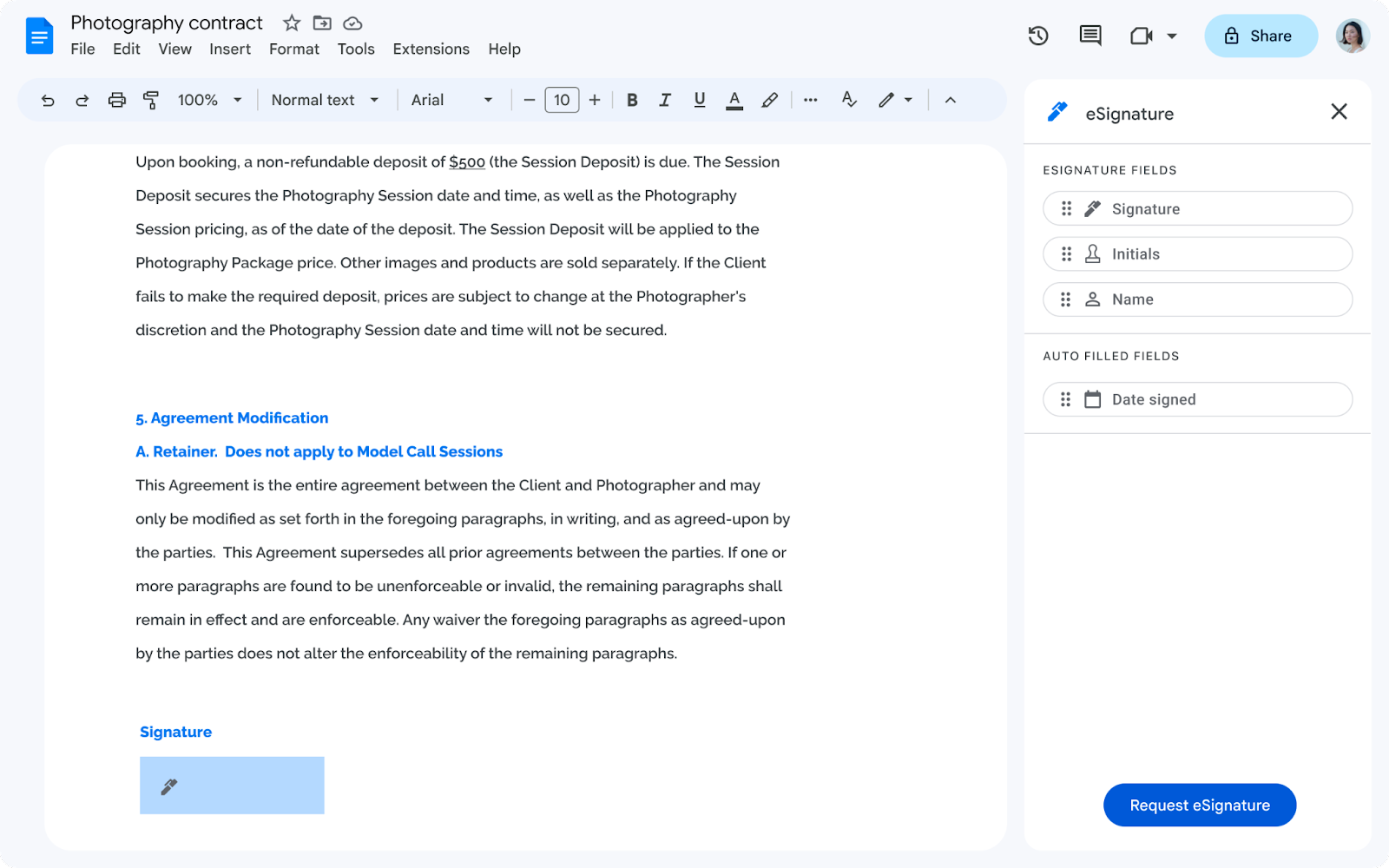 Screenshot from Google, August 2023
It streamlines processes for requesting signatures, viewing the status of pending requests, and finding completed contracts.
For the recipient, signing a document within an official Google Drive eliminates the need to switch apps or tabs. A more straightforward process could decrease the time it takes to complete a contract.
Early Access Application For eSignature & Customizable “Email Layouts v2” In Gmail
Select Google Workspace business, education, enterprise, and non-profit customers can apply for early access to eSignature.
Also mentioned on the application is a test product for “Email Layouts v2” in Gmail that allows users to “…create, edit and customize email layouts in Gmail.”
Both features could improve contract management for Workspace users, from sending a contract by email with a customized layout to acquiring the signature from a client within Gmail.
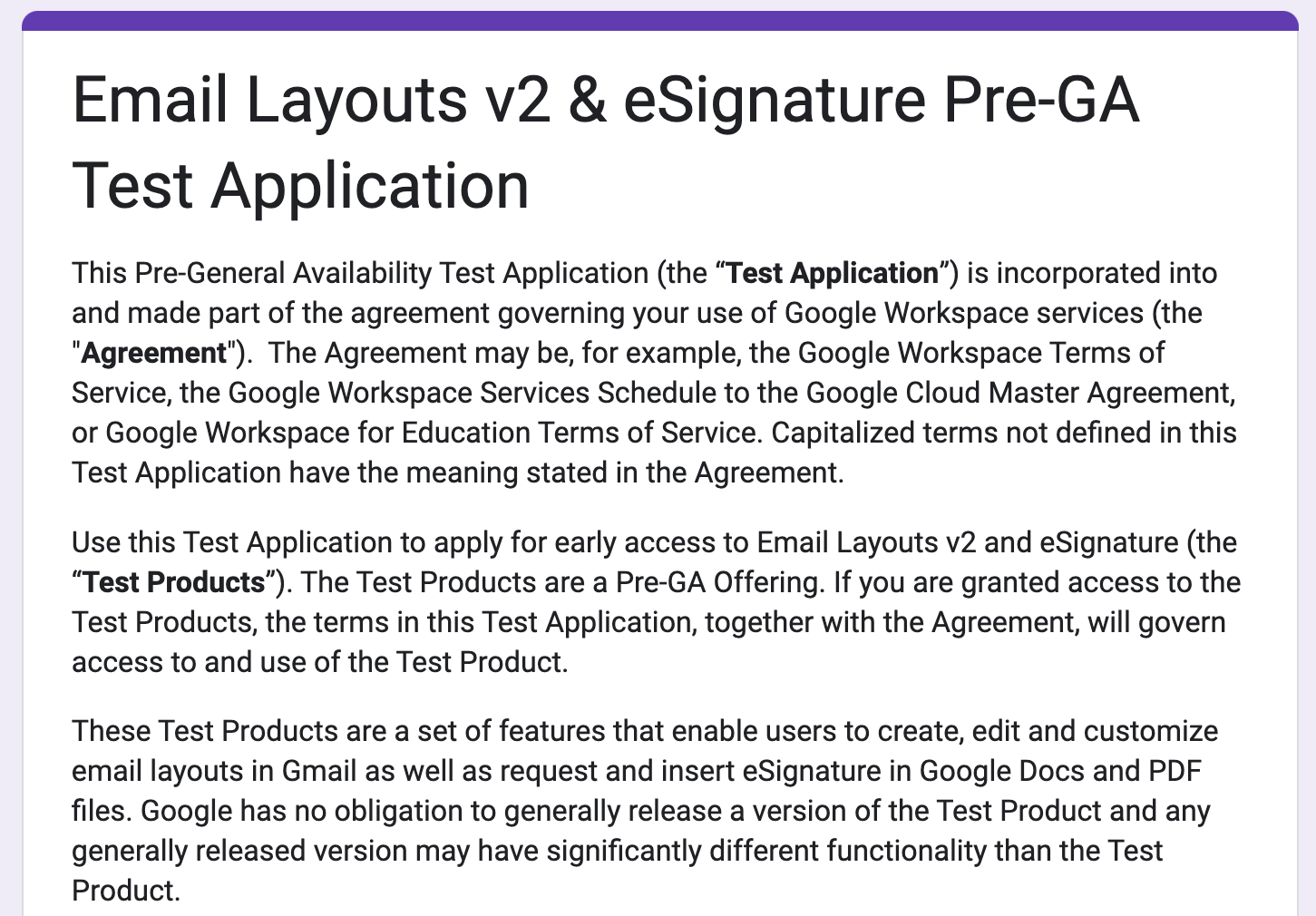 Screenshot from Google, August 2023
Upcoming Plans For Workspace Test Products
Google has plans to enhance eSignature capabilities later in the year with features including a contract audit trail, the ability to request multiple signatures, support for signatures from non-Gmail users, and eSignature on PDF files stored in Drive.
For Workspace users with contracts and agreements, the new eSignature capabilities in Google Docs and Drive, plus customizable email layouts, could significantly simplify the process of acquiring signatures.
Featured image: Tada Images/Shutterstock
Mozilla has implemented a performance upgrade to its Firefox web browser that could translate into faster website load times – welcome news for SEO professionals and their clients.
The technical details involve moving certain tasks, specifically decompression of gzip and brotli content, away from the browser’s main processing thread.
While this might sound complex, the result is quite simple: web pages load more quickly and feel more responsive when using Firefox.
Networking decompression (gzip, brotli) have been moved off-main-thread as part of ongoing efforts to reduce main thread contention. This work has delivered huge performance wins on our high level page load metrics, reducing FCP and LCP by 10%. See https://t.co/1vVMg6LINc
— Firefox Nightly
(@FirefoxNightly) April 18, 2024
The Firefox dev team states:
“This work has delivered huge performance wins on our high-level page load metrics, reducing First Contentful Paint and Largest Contentful Paint by 10%.”
First Contentful Paint and Largest Contentful Paint measure how quickly websites render content visible to users after navigation.
Improving these by 10% could mean millions of web pages loading noticeably faster in Firefox.
See also: Get Ready For Google’s INP Metric With These 5 Tools
Why SEJ Cares
For SEO professionals, websites that load quickly are crucial for providing a good user experience, potentially influencing search rankings.
Any measures that speed up load times are good for SEO.
The performance upgrade has also drawn praise from web experts.
Barry Pollard, a respected voice on web performance, tweeted that Firefox’s threading change “should be some good responsiveness wins” that could enhance browser interactivity.
Nice. Should be some good responsiveness wins by this too for Firefox users. INP isn’t measurable in Firefox at the moment but would have shown this if it was. https://t.co/46nAFL6MQW
— Barry Pollard (@tunetheweb) April 18, 2024
Looking Ahead
In the constantly accelerating online world, shaving precious milliseconds off load times keeps websites competitive and users engaged.
As Firefox rolls out this updated version, expect faster load times and smoother user experiences in this browser.
FAQ
What are First Contentful Paint and Largest Contentful Paint, and why are they important?
First Contentful Paint (FCP) and Largest Contentful Paint (LCP) are performance metrics used to assess the speed at which a website presents visual content to its users after navigation.
FCP measures the time from navigation to when the browser renders the first piece of content from the DOM, providing a user with the first visual indication that a page is loading.
LCP, on the other hand, marks the point in the page load timeline when the largest text block or image element is rendered on the screen.
These metrics are relevant to SEO as they indicate user experience quality and are part of Page Experience, a Google ranking signal. Faster FCP and LCP times generally correlate with a better user experience, which can positively impact search visibility.
Featured Image: T. Schneider/Shutterstock
Display ads are no longer the remarketing afterthought they used to be.
A powerful creative matched with clever targeting can inspire transactional desire, as well as prequalify prospects with important insights.
No one wants to stunt a campaign in the set-up.
That’s why this month’s Ask the PPC question is a great one for all looking to leverage Display.
Prabesh from Kathmandu asks:
“Why isn’t responsive display campaign not working for different kind of creatives? What are sizes of the creative to be used in responsive display?”
We’re going to look at the following questions to ensure the correct display set-up:
- Who can advertise on display?
- Which creatives are acceptable?
- How are placements impacted by creatives?
Note: The Google Display Network (GDN) and Microsoft’s Audience Network (MAN) have a lot of overlap, so the advice used for one is applicable to the other.
Who Can Advertise On Display
All ad networks have editorial policies around which industries can advertise on their channels.
If you fall into one of the following categories, display ads won’t be fully/at all available to you.
- Gambling.
- Weapons.
- Adult Toy/Entertainment.
- Counterfeit Goods.
- Predatory Financial Services.
- Enabling Dishonest Behavior (fake passports, test-takers, etc.).
If you’re trying to have your ads serve on all placements (including those intended for kids and teens), you might face further restrictions.
Other than those restricted industries, display ads are fairly accessible to most brands.
Which Creatives Are Acceptable?
This is the heart of this month’s question: which sizes and creatives can be used.
Responsive display ads need the following sizes:
- Landscape (1.91:1): 1200 × 628 (min required: 600 × 314, max file size: 5120KB).
- Square: 1200 × 1200 (min required: 300 × 300, max file size: 5120KB).
Logos need to be:
Landscape Logo (4:1)
- Recommended size: 1200 x 300.
- Min. size: 512 x 128.
Square Logo (1:1)
- Recommended size: 1200 x 1200.
- Min. size: 128 x 128.
Note: The maximum file size for any image is 5120 KB.
Images need to be clear, not violate any editorial policies, and uploaded in the way most people would agree is correct (i.e., not sideways or upside down).
If your image is too big for standard sizing, you’ll be given the opportunity to crop it.
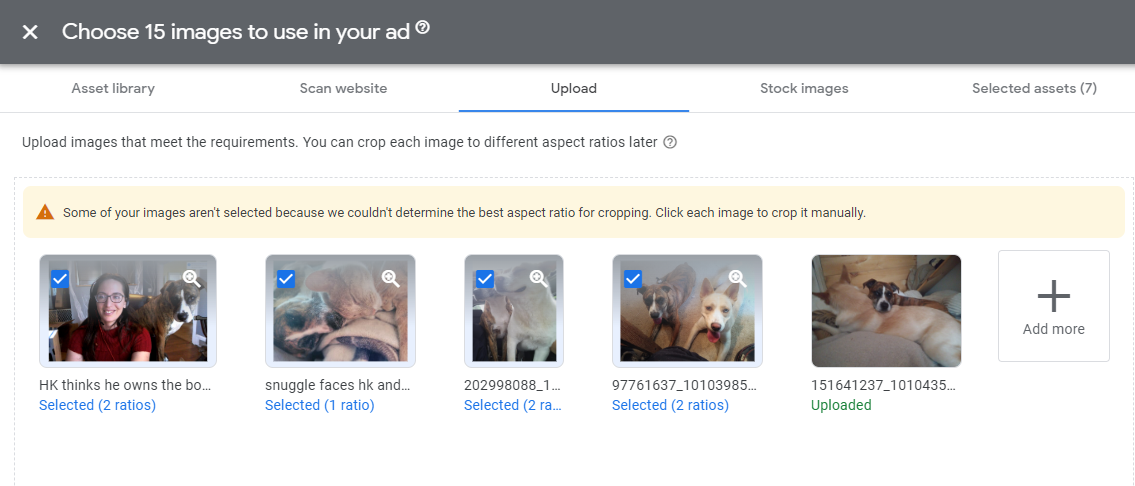 Screenshot from Google Ads, July 2022
Cropping can sometimes leave your image looking worse, so be careful as you’re working with the tool.
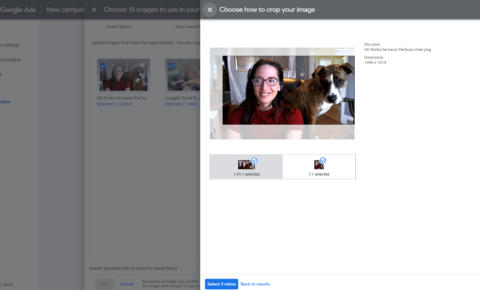 Screenshot from Google Ads, July 2022
Video can be a powerful creative tool.
Make sure your video conveys the intended message even without sound.
Upload your 30-second video to YouTube and then connect it to your display campaign.
How Are Placements Impacted By Creatives?
One of the biggest benefits of RDAs (responsive display ads) is how many placements they unlock.
Rather than being limited by inventory fitting your uploaded assets, your campaigns will get access to more spots.
That said, there are some limitations.
Ad networks will make educated guesses about your content.
If a publisher has set restrictions (mature content, brands, etc.), your ad won’t be able to serve with them.
Additionally, if the publisher has limited which placement sizes can serve, you might not get the placement due to Google seeing your creative perform better with other sizing.
Final Takeaways
Both creative asset sizing and content can lead to a lack of placements.
It’s important to upload creative that can be used for all placements and be realistic about what limitations your industry might have.
Have a question about PPC? Submit via this form or tweet me @navahf with the #AskPPC hashtag. See you next month!
More resources:
- How To Optimize Google Responsive Search Ads (RSAs)
- What Are Display Ads: A Complete Guide for Digital Marketers
- PPC 101: A Complete Guide to Pay-Per-Click Marketing Basics
Featured Image: Paulo Bobita/Search Engine Journal
As retailers prepare for an unusually short holiday shopping season, Google has announced several new AI-powered features for its advertising and merchant tools.
With Black Friday falling later this year, the period between Thanksgiving and New Year’s is compressed compared to recent years.
At its annual Think Retail event, Google unveiled updates to its Merchant Center and Google Ads platforms. These changes include:
- AI-generated shopping trend insights
- Automated performance summaries for merchants
- Custom data report generation using natural language prompts
- Streamlined process for syncing local inventory data
- New customer acquisition goals for ad campaigns
- Profit-based optimization options for certain campaign types (in beta)
Jeff Harrell, Senior Director of Merchant Shopping at Google, stated that the new features aim to help businesses “stay agile and turn data into decisions quickly” during the shortened season.
Why This Matters
The compressed 2024 holiday shopping timeline – with only 26 days between Black Friday and Christmas compared to 32 in 2023 – presents challenges for retailers. Some analysts predict this may lead to earlier and more aggressive promotional activity.
Google’s updates appear designed to assist businesses in adapting to rapidly changing consumer behavior during this crucial sales period. However, it remains to be seen how effective these new tools will be in practice.
How This Can Help You
For retailers and advertisers:
- Access to real-time trend data to inform inventory and marketing decisions
- Automated insights to quickly identify performance issues or opportunities
- Easier management of local inventory ads
- New tools to target and acquire new customers
- Options to optimize campaigns based on profit rather than just revenue
For consumers:
- More accurate product availability information, especially for local stores
- Potentially better-timed and more relevant promotions from retailers
- Improved shopping experience with up-to-date inventory across online and offline channels
Looking Ahead
These updates come as Google faces increasing competition in e-commerce from platforms like Amazon and social media sites. The new features attempt to solidify Google’s position as a starting point for online shopping.
It remains to be seen if Google’s AI-powered tools can drive revenue during a shortened shopping season.
When Google launched its Privacy Sandbox, the news rang alarm bells for B2B marketers and advertisers. This signaled an end to third-party cookies on Google Chrome, which has over 65% of the browser market share.
The Privacy Sandbox, however, was only the final nail in the coffin for evolving legislation across the world to improve privacy compliance – particularly the GDPR in the European Union and the CCPA in the U.S. (and various other state regulations since following).
Despite setbacks announced by Google to eliminate third-party cookies (three times now in June 2024, with the last delay announced in April of the same year), preemptively building your first-party database is paramount for being prepared when these cookies are truly phased out.
Investing in this now presents a competitive advantage as many organizations have deprioritized their strategies to navigate the phase-out, which will likely lead to significant disruption when the Privacy Sandbox comes into effect.
Indeed, 75% of marketing and client experience users relied heavily on third-party cookies in 2023, and 45% of leaders are spending over half of their marketing budgets on cookie-based activations.
In this guide, I present a simple, three-step process to futureproof your data strategy.
The idea is to start with a demand generation program to collect your initial batch of first-party data and continue to enhance it in future iterations while phasing out third-party sources.
1. Survey Clients To Build Up Your First-Party Data
Surveying clients is the first step to building up your first-party database because they can comment on your buyer experience, as well as the quality of service.
The focus of this survey is to gain rich first-party data to inform updates to your buyer personas and Ideal Customer Profiles (ICPs) in line with your loyal clients to guide your demand generation strategy.
Therefore, determining precise questions that enable you to field actionable insights is key for this survey.
Below are four examples of questions to encourage clients to share valuable, first-party data:
- Net Promoter Score (NPS): From 0 to 10, how likely is it that you would refer [Organization X] to your colleagues?
- Pain points: What challenges made you consider purchasing a solution from [Organization X]?
- Unique Value Proposition (UVP): What 3 unique features of [Organization X] do you like the most?
- Market positioning: On a scale from 0 to 10, how much do you prefer [Organization X] over [Competitor Y]?
These are just a few of the many questions we ask loyal clients at INFUSE. Since buyer personas and ICPs are fictional representations, it is key to continuously inform them with rich first-party data to maintain their accuracy and relevance.
Recommendations
- Make a cheat sheet of buyer pain points for all client-facing teams.
- Revisit your lead scoring and segmentation practices based on the survey results.
- Craft a whitepaper, ebook, infographic, and other assets with survey insights to share with respondents and your audience.
2. Conduct A Demand Program To Gain Audience First-Party Data
Once you have first-party data from surveys, you should develop and launch a trial demand generation program to refine your data.
The idea is to gain insights from key buyers to enrich your buyer personas and bolster overall go-to-market (GTM) and demand strategies.
Below is a process to launch your first trial demand generation program and refine your first-party database:
Start With Owned Media And Social Selling
Kickstarting your trial demand program by activating your owned media with your sales teams is a great first step that allows you to fully control your approach to engaging your audience and fielding first-party data.
Leveraging a content marketing strategy is an effective way to collect first-party data. Start small, but think of a high-value gated asset for this trial that will generate demand and encourage contact form fills (lead generation), such as a whitepaper, report, or learning course.
Then, you must build a demand strategy around this high-value asset to establish rapport with your audience and encourage continued engagement.
For example, if you opt for a whitepaper, support this with initiatives across your other channels, such as publishing curated insights on social media and crafting slides for your sales team to share with prospects.
The idea is to build a content marketing suite to support your demand program across the channels your audience frequents, creating a stronger basis of brand-to-demand and richer data insights as a result.
Recommendations
- Nurture prospects with personalized email cadences to keep your brand top of mind and collect further first-party data (such as engagement with certain topics).
- Develop materials to enable your sales team to share high-value assets and build interest.
- Create snackable content, such as 30-second social media videos, that highlight the value of your content and encourage conversions.
Find A Content Distribution Partner
The right content distribution partner can greatly increase the reach of your demand program and engage audiences beyond your owned channels.
However, data quality is key when seeking partners. Since the goal is to obtain first-party data and select partners based on their ability to provide this data, as well as its quality – it should complement your existing dataset rather than offer redundant insights.
Focus on content distribution partners with an opt-in audience and managed ecosystems that certify that prospects have engaged with the right content.
This allows prospects to be identified and matched with your buyer personas and then routed to your organization for further engagement.
Content distribution partners commonly have databases with prospects and their market segmentation criteria. This ensures high-value assets are distributed to prospective buyers who are a good fit for your organization and its offerings.
Recommendations
- Audit the content distribution partner and ask questions about how they segment their audience and ensure data privacy compliance.
- Create a follow-up structure at your organization for receiving prospects from the partner, such as an email cadence that provides more context to the high-value asset.
- Refine your outreach targeting with market segmentation information collected by the partner.
Combining first-party data from your owned media and content distribution partner, you are ready to conduct the demand program until its completion. This should ideally take at least a quarter to glean substantial insights and a broader overview of prospect interactions (and may need to be longer, depending on your sales cycle).
3. Analyze And Optimize First-Party Data Acquired From Your Demand Program
Once the demand program has been finalized, it is now time to analyze and optimize your first-party database.
This is the start of a continuous cycle of improvement and data enrichment, which will be enabled by actioning optimizations to your owned media and partner content distribution.
Below are four questions to guide your analysis when reviewing program results and the quality of your first-party database.
Are The Datasets Relevant And Actionable?
Since the principal goal of first-party data is to inform future strategies and target prospects with precision, its accuracy and role in achieving this should be the primary assessment criteria.
Recommendations
- A/B test different contact form fields to glean relevant information (such as technographic data).
- Train sales teams to qualify prospects by leveraging your high-value content assets.
- Utilize lead nurturing cadences to clarify specific information, such as key buyer challenges, available budgets, and members of the prospect’s buying committee.
- Interactive touchpoints, such as quizzes, can glean this information in a user-friendly manner.
Are Your Buyer Personas And ICPs Still Relevant?
It is quite common for trial programs to highlight misalignments between the audience that engaged with your assets and your buyer personas and ICPs.
Trials can also identify how the key pain points of your personas have evolved or become outdated, indicating necessary updates needed to ensure the relevancy of your messaging across all channels.
Independent of the findings you acquired, regularly examining and updating these profiles is beneficial.
Recommendations
- Analyze the prospects from the trial with an “open mind,” ensuring that your new profiles truly reflect their pain points and aspirations – rather than fit them into an existing model.
- Discuss your findings with client-facing teams, particularly sales, to determine their relevance and enrich them with further personal insights.
Is Your Unique Value Proposition (UVP) Still Relevant?
Similarly to your ICPs and personas, your UVP might require a refresh to ensure its relevance.
Due to its strategic nature, ensuring that your UVP is relevant informs all your organizational processes and communications, as well as steering how your brand is perceived by your audience.
The importance of your UVP also means that trialing new versions is key to ensuring its effectiveness before cementing it in the market.
Recommendations
- A/B test your new UVP and complement this test with other methods (if available), such as focus groups, email nurturing, and surveys.
- Identify common keywords and expressions used by prospects when discussing their pain points.
- Analyze the benefits of your products and how well they align with the objectives of the prospects that were identified during your demand program.
Are Your Client-Facing Teams Following Outdated Playbooks?
Client-facing teams often have style guides, GTM playbooks, cheat sheets, and other materials to inform their daily activities. These assets can become rapidly outdated if they are not routinely audited.
Therefore, it is essential to revisit these assets, leveraging findings from your first-party database to ensure their relevance, considering the changes to your buyer personas, ICPs, and UVP.
Recommendations
- Prioritize strategic assets used daily by teams, such as process documents and style guides.
- Analyze marketing and sales outreach to assess if their approach regarding pain points is still relevant.
- Book a session sharing tactics and key takeaways from the new first-party database to inform playbook optimizations.
These are only a few of the many optimizations you can perform after analyzing first-party data from your demand program.
When determining where to start your optimizations, look for low-effort, high-reward projects, specifically client-facing activities. The key is prioritizing the highest value for your organization and ensuring your first-party database empowers you to achieve your goals.
The demand program showcased in this article can serve as a foundation for future iterations to continuously enrich your first-party database.
Key Takeaways
When launching your demand programs and building your first-party database, keep these considerations top of mind to ensure the longevity of your strategies:
- Begin with owned media: It is essential to optimize and enrich your owned media channels to start collecting first-party data. Kick-off this strategy with one gated asset in a trial demand program to gain insights.
- Find a content distribution partner: Broaden your scope and engage pre-qualified prospects via a trustworthy partner that can enrich your first-party database with insights from new or expanded audiences.
- Analyze results and optimize: Scrutinize the findings, summarize them, and determine priority updates to strategic areas and assets, such as your UVP, personas, and playbooks.
More resources:
- What Is Quality Data And How It Connects Search, Content, And AI Success
- Marketing Attribution: Everything You Need To Know
- B2B Lead Generation
Featured Image: ArtemisDiana/Shutterstock
A week after releasing the troubled version 6.6, WordPress has released another version that fixes seven major issues including two that caused fatal errors (website crashes), another issue that caused a security plugins to issue false warnings plus several more that created unwanted UI changes.
Fatal Errors In WordPress 6.6
The one issue that got a lot of attention on social media is one that affected users of certain page builders and themes like Divi. The issue, while relatively minor, dramatically changed the look of websites by introducing underlines beneath all links. Some on social media joked that this was a fix and not a bug. While it’s a generally a good user practice to have underlines beneath links, underline aren’t necessary in all links, like in the top-level navigation.
A post on the WordPress.org support forums was the first noticeable indications in social media that something was wrong with WordPress 6.6:
“Updating to 6.6 caused all links to be immediately underlined on a staging divi themed site.”
They outlined a workaround that seemed to alleviate the issue but they were unsure about what the root cause of the problem was.
They then posted:
“But does anyone think this means I still have something wrong with this staging site, or is this a WordPress version update issue, or more likely a divi theme issue I should speak to them about? Also, if anyone is even familiar with expected Rparen error…that I’m just riding with at the moment, that might help. Thanks.”
Divi issued an emergency fix for that their users could apply even though the issue was on the WordPress side, not on the Divi side.
WordPress later acknowledged the bug and reported that they will be issuing a fix in version 6.6.1.
The Other Issues Fixed In 6.6.1
Fatal Error
is_utf8_charset() undefined when called by code in compat.php (causes a fatal error).
A section of code in 6.6 caused a critical issue (fatal error) that prevents the website from functioning normally. It was noticed by users of WP Super Cache. WP Super Cache developed a temporary workaround that consisted of completely disabling the website caching.
Their notation in GitHub stated:
“Disabling the cache removes the error but is far from ideal.”
Php Fatal Error
“PHP Fatal error: Uncaught Error: Object of class WP_Comment could not be converted to string.”
There was a problem with a part of the WordPress code where one part was trying to get the name of the person who left a comment on a post. This part of the program was supposed to receive a number (the comment ID) but sometimes it was getting a more complex piece of information instead (a WP_Comment object) which then triggered a PHP “fatal error.” An analogy might be like trying to fit a square peg into a round hole, it doesn’t work.
This issue was discovered by someone who was using the Divi website builder.
The other bugs that are fixed didn’t cause websites to crash but they were inconvenient:
- Fixed a bug that caused security plugins to issue a false positive about possible hacker files.
- Fixed a bug in how the admin toolbar was displayed
- Invalid CSS – this caused an unwanted horizontal scroll on a web page.
- Issue in Post Editor that caused the category chooser box become extra long instead of showing a scroll UI within a set size.
Read the full details of WordPress 6.6.1 maintenance release:
WordPress 6.6.1 Maintenance Release
Featured Image by Shutterstock/HBRH